
一,添加copy-code.swig
在博客根目录下,输入:
cd themes/next/layout/_third-party/然后在次文件夹下创建copy-code.swig的文件,内容如下
{% if theme.codeblock.copy_button.enable %}
  <style>
    .copy-btn {
      display: inline-block;
      padding: 6px 12px;
      font-size: 13px;
      font-weight: 700;
      line-height: 20px;
      color: #333;
      white-space: nowrap;
      vertical-align: middle;
      cursor: pointer;
      background-color: #eee;
      background-image: linear-gradient(#fcfcfc, #eee);
      border: 1px solid #d5d5d5;
      border-radius: 3px;
      user-select: none;
      outline: 0;
    }

    .highlight-wrap .copy-btn {
      transition: opacity .3s ease-in-out;
      opacity: 0;
      padding: 2px 6px;
      position: absolute;
      right: 4px;
      top: 8px;
    }

    .highlight-wrap:hover .copy-btn,
    .highlight-wrap .copy-btn:focus {
      opacity: 1
    }

    .highlight-wrap {
      position: relative;
    }
  </style>

  <script>
    $('.highlight').each(function (i, e) {
      var $wrap = $('<div>').addClass('highlight-wrap')
      $(e).after($wrap)
      $wrap.append($('<button>').addClass('copy-btn').append('{{__("post.copy_button")}}').on('click', function (e) {
        var code = $(this).parent().find('.code').find('.line').map(function (i, e) {
          return $(e).text()
        }).toArray().join('\n')
        var ta = document.createElement('textarea')
        document.body.appendChild(ta)
        ta.style.position = 'absolute'
        ta.style.top = '0px'
        ta.style.left = '0px'
        ta.value = code
        ta.select()
        ta.focus()
        var result = document.execCommand('copy')
        document.body.removeChild(ta)
        {% if theme.codeblock.copy_button.show_result %}
          if(result)$(this).text('{{__("post.copy_success")}}')
          else $(this).text('{{__("post.copy_failure")}}')
        {% endif %}
        $(this).blur()
      })).on('mouseleave', function (e) {
        var $b = $(this).find('.copy-btn')
        setTimeout(function () {
          $b.text('{{__("post.copy_button")}}')
        }, 300)
      }).append(e)
    })
  </script>
{% endif %}然后返回上一层目录,即layout文件夹下,编辑_layout.swig,如下图
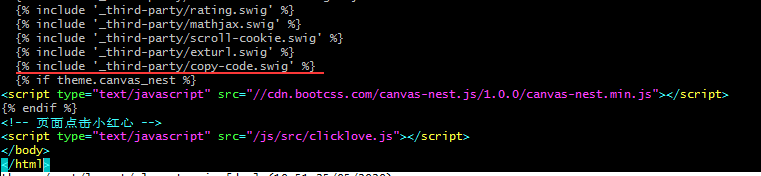
在图中位置添加:
{% include '_third-party/copy-code.swig' %}
评论